


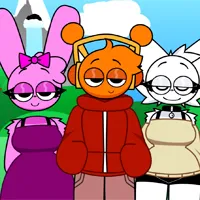
Sprunki Digital Circus
report

More games like Sprunki Digital Circus

Sprunki Digital Circus

I put sprunki digital circus here for players who want a music mixer full of Pomni, Jax, Caine, Ragatha, Kinger, Zooble, Bubble, and the stranger faces from the circus. The stage begins with seven gray performers beneath a bright blue sky. Drag a colorful icon onto one of them and the blank figure turns into a circus character with a repeating beat, melody, voice, or effect.

This is a creative music toy rather than a level based challenge. There is no timer, opponent, or required final song. Every icon supplies one part of the arrangement, so the goal is to find a set of loops that sounds good together. The cheerful opening also hides a darker option. The final Black icon changes the cast into horror versions, while Kaufmo can disrupt the current circus world in a different way.

The free browser version works with mouse or touch and needs no account or download. Start with only two or three performers, listen through a complete loop, then decide what the mix actually needs. A smaller group makes each circus sound easier to recognize before the stage becomes crowded.

How to Play Sprunki Digital Circus

1
sprunki digital circus stage with seven gray performers and colorful icons

Dress the first gray performer

Drag one colorful icon from the lower tray onto any gray figure. The performer changes appearance and its sound begins looping immediately.

2
sprunki digital circus lineup with Pomni Jax Ragatha and other performers

Build a balanced circus mix

Add two or three more icons for rhythm, melody, and voice. Let every new part play for a full cycle before filling another slot.

3

Refine the song or reveal dark mode

Remove a sound that clashes, or reset the stage with the round arrow. When the bright mix is finished, try the black icon to reveal the darker circus versions.

A circus cast built from sound

The appeal of sprunki digital circus starts with recognition. Instead of the usual cast, the sound tray uses objects and colors connected to circus personalities. A purple rabbit icon calls in Jax. A jester hat brings Pomni. Other symbols reveal Ragatha, Caine, Kinger, Zooble, Bubble, Kaufmo, and more performers. The transformation is immediate, which makes the tray feel like both an instrument rack and a character selector.

Seven gray figures wait in a row. They look deliberately plain so every dropped icon creates a clear before and after moment. Once dressed, a figure moves with its assigned loop and adds a new voice to the group. The visual result can be funny even before the music settles. Jax shows a huge yellow grin, Pomni stares through spinning red and blue eyes, and Caine appears as a ring of teeth around mismatched eyes.

The outdoor background keeps the opening mood light. Green hills, white clouds, and a striped circus tent sit behind the performers. The image also makes the normal and horror states easy to distinguish. In the regular state, the bright costumes and simple scenery remain intact. After Black is used, the altered faces and darker details become the focus.

The character names help identify the crossover, but they do not describe the musical role of each icon. A favorite character may provide a rhythm, voice, melody, or effect that does not fit the current song. Test the sound before deciding to keep the performer. The most useful lineup is not necessarily the one with every famous face. It is the one where the individual loops remain audible instead of covering each other.
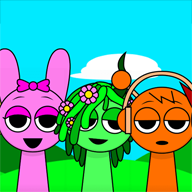
Turn seven slots into one clear arrangement

The controls are simple enough to understand without a tutorial. Pick an icon from the two rows below the stage, hold it, and place it on a gray figure. Its loop joins the current song and stays synchronized with the other active parts. Repeat the action to build a larger ensemble. Selecting an active performer gives access to the familiar controls for muting, isolating, or removing that sound.

A good first arrangement uses contrast. Begin with a steady rhythm that makes the pulse obvious. Add a second icon with a longer melodic shape. The third can be a voice or a short comic effect. Stop there for a moment. If all three can still be heard, add a fourth. If one disappears, isolate the parts and decide which pair is occupying the same musical space.

Filling every slot is not automatically an improvement. Seven loud loops can flatten the personality that made each one fun. Two rhythms may reinforce each other, but two busy melodies can compete. A short vocal often works better when the surrounding characters leave a gap. The mute and solo buttons are useful because they let one performer be tested without destroying the rest of the arrangement.

The round arrow at the upper right clears the experiment and returns the seven gray figures. Resetting is useful after testing the dark state, but careful swapping usually teaches more. Remove only the newest performer when a mix becomes muddy. The remaining group shows whether that last addition caused the problem. Then try a different tray icon in the same position and compare one full loop.

On a phone, landscape orientation gives the tray and stage more room. Drag from the middle of an icon so a fingertip does not cover the target figure. If a drop misses, let the icon return to the tray and aim for the center of a gray slot rather than making several quick placements. Headphones help separate quiet voices and background effects from the strongest rhythm.

Kaufmo and the darker side of the tent

The opening session is colorful, but the last part of the tray hints that the circus is not completely safe. The black icon acts as the main dark switch. Place it when the regular arrangement is established and the familiar cast takes on horror styling. The shift changes the visual tone while preserving the basic idea of assigning sounds to stage positions.

This darker state is optional. Players who only want Pomni, Jax, and the bright outdoor circus can ignore the black icon for an entire session. That is why the game belongs in the No Horror collection even though it contains scary artwork. The default presentation is cheerful, and the unsettling version must be deliberately selected.

Kaufmo is not the same control as Black. Black is the dedicated icon that transforms the whole cast into horror versions. Kaufmo is a corrupted clown performer whose arrival can cause a dramatic change within the current circus run. Build a normal mix first, then add Kaufmo on an open slot so the visual and musical response is easy to identify.

If Kaufmo or Black takes the session in a direction that no longer suits the song, use the round reset button and rebuild. Reset is also the cleanest way to compare the normal and horror versions of one arrangement. Remember three icons, clear the board, activate Black, then place those three choices again. This reveals whether the transformed sounds still play the same role or require a different balance.

A practical way to learn the full sound tray

The tray has twenty icons but the stage holds only seven performers, so one full lineup cannot reveal every sound. The fastest way to learn the set is to audition icons in small groups. Place one icon on the first gray figure, listen for a complete cycle, then decide whether it behaves like rhythm, melody, voice, or effect. Add a second only after the first role is clear.

When testing a crowded arrangement, click a performer and use solo to hear that loop by itself. Use mute to check whether the song becomes clearer without it. Remove the performer only when the part is no longer useful. These controls preserve the rest of the lineup and make comparison faster than resetting after every weak combination.

Save the final two slots for sounds that solve a specific problem. If the mix has pulse but no recognizable tune, look for a melody. If it already has several voices, choose a quieter effect instead of another vocal. A slot does not need to be filled merely because it is empty. Four distinct parts often produce a clearer result than seven parts competing at the same volume.

Change one icon at a time when searching for a better version of a song. Keeping the rhythm fixed while swapping melodies makes the difference easy to hear. Keeping the melody fixed while replacing one voice reveals which performer is masking it. This approach also gives Kaufmo and Black a meaningful test, because their effect can be compared with a mix that was already understood.

There is no score that declares one combination correct. The useful standard is clarity: the pulse should be easy to follow, the main tune should remain recognizable, and special effects should add character without burying both. Once those parts are stable, the remaining slots can be used for stranger choices and comic sounds.

More character mixers worth opening next

For another bright crossover cast, Sprunki PvZ turns familiar plant and zombie shapes into musical choices. Sprunki Superhero keeps the colorful costume idea but trades circus performers for a caped team. Sprunki Cute Time is the softer option when cheerful icons and a calm stage matter more than a dark surprise. Sprunki Cool As Ice offers another bright themed mixer with an optional unsettling switch. For a much larger tray and more room to test unusual layers, Sprunki OC V3 is the strongest next stop.

FAQs about Sprunki Digital Circus

It is a free music mixer that turns Pomni, Jax, Caine, Ragatha, Kinger, Zooble, Bubble, Kaufmo, and other circus characters into looping sound parts. Drag their icons onto seven gray performers to build a song.
Drag an icon from the lower tray onto a gray figure. Add more performers to layer rhythm, melody, voices, and effects. Mute, isolate, or remove parts to refine the mix, and use the round arrow to reset.
The cast includes recognizable versions of Pomni, Jax, Caine, Ragatha, Kinger, Zooble, Bubble, and Kaufmo, plus additional circus themed choices represented by colorful tray icons.
The default stage is bright and playful. A black icon can reveal darker character versions, but that choice is optional. Ignore it if you only want the colorful circus mix.
Kaufmo is a corrupted clown who can trigger a dramatic visual change in the circus world. Try him after building a normal mix so the difference is easy to see, then reset if you want the bright stage back.
Yes. Touch and drag works in a modern mobile browser. Landscape orientation gives the seven stage positions and two icon rows more room.
Yes. It is free to play in the browser with no account and no download.